How can I use a presentation as a prototype?

How can I use a presentation as a prototype?

You can use a presentation as an interactive prototype. You can use the link feature that is available in Keynote, Google Slides or Powerpoint to link to another slide when someones click on a specific object or image in a slide.
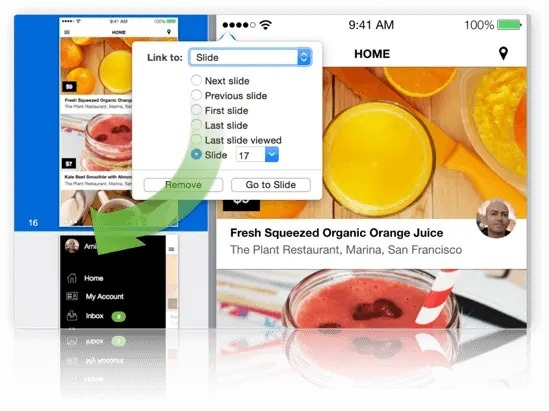
This can help you build, for example:

  • A clickable prototype of digital experiences like an app or website. If you want to do this, there is even a template for Keynote and Powerpoint that helps you to do so even quicker called Keynotopia.

  • A prototype of a space where people can move to one room to the other by clicking on the doors.

  • A prototype of a service where you can click on a specific part of a Service Blueprint to get more details about that specific moment of the customer journey.

Basically, here the presentation is like one of these adventure books where kids choose how the story goes. For example, when the kid wants the hero to win, he has to go to page 40; if the hero fails, the kid has to go to page 30.

Q&A: Presentations and Service Design

Buy nowLearn more

Efficient presentations

  • What are tools to create presentations faster?
  • When should I create a presentation and when not?
  • What are good storylines I can use to structure a presentation?
  • How to create quickly summaries for presentations?
  • What's one of the best slide structure and design?

Interactive presentations

  • How can I use a presentation as a prototype?
  • How can I embed a whiteboard in my presentation?
  • How can I embed a timer in my presentation?

Presentations and public speaking

  • How can I keep the engagement and focus high during a presentation?
  • How can you write and prepare good presenter notes for your presentations?
  • ▶️ How can I make presenting less painful?

Long presentations

  • How to create presentations that work for multiple stakeholders?
  • How can I fix a presentation that goes all over the place?
  • What are good ways to finish a presentation?